

WIRELESS CALCULATOR RECORDER 4GB
Wireless camera system in a calculator.
Operate with 9v Battery or direct wall power.
No Installation just plug and play.
Catch who is visit your room or your office, defennt your home and office.
Fit for the security system of stores, banks, hotels, school, hospitals. factories and apartments
Functions:
Built in 4GB Memory.
CMOS color / 2.4GHz / wireless/Audio.
Rule:PAL/CCIR NTSC/EIA.
Effective picture element :PAL:628x582 NTSC:510x492.
Horizontal definition :380 Line.
Minimum Illumination: 3.0 Lux.
Scan Frequency: PAL/CCIR: 50Hz, NTSC/EIA: 60Hz.
Sensitivity: +18DB - AGL ON-OFF.
Transmitter power: 50mW . Distance: 50 - 100M .
Electric power: DC8V/9V . Built-in Li-battery, working 2 hours continuously(Max)
No need for driver installation if the operating system is Windows ME/ 2000/ XP/ Mac OS 9.2.2 or above (windows98 is excepted) Package Include: 1 X 4GB
The Instruction of Spy DVR calculator
Ⅰ.Preface
Thank you for purchasing this product. Under the guidance of this manual, you may use this item and the subsidiary application procedures properly. Please read the manual carefully before using, so that you can operate it correctly and freely.
Ⅱ. Function summary
● 300K pixels
● Vedio Format:AVI
● Photograph Dimension:352*288
● Memory:1GB/2GB/4GB/8GB (optional)
● Vedio Recording Function
● USB: 2.0(Hs)
● Built-in Li-battery, working 2 hours continuously(Max)
● No need for driver installation if the operating system is Windows ME/ 2000/ XP/ Mac OS 9.2.2 or above (windows98 is excepted)
Ⅲ. Charging
1. Built-in rechargeable Li-battery, please insert the USB cable to the DVR wrist calculator firstly and then be in charging when the USB plug is connect with charger or inserted into the USB
2. If there is not enough power supply while photographing, the cam corder will be power off automatically. The system will store the photograph files automatically before power off to ensure their safety.
Ⅳ. Appearance & Keys
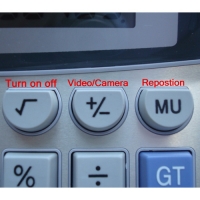
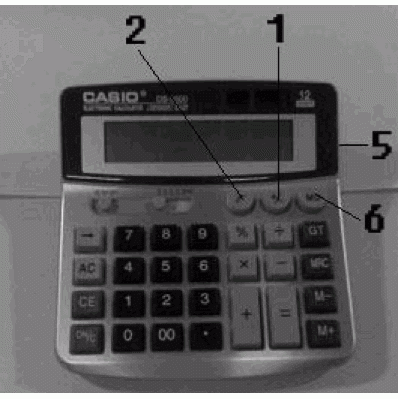
1. Vedio recording/Save
2. Power button/take pictures
3. LED light
4. MIC
5. Camera
6. Reset button
Ⅴ. Method of Operation
1. Power-on: long press the Power button(2), the yellow light on and twinkles three seconds, the yellow light off and go into standby status.The yellow LED fast flashing.
2. Press camera start button(1) into camera status and the blue LED on. Press camera start/pause button(1) again, the blue LED off and save.
3. Press Power button(2) to take pictures in standby status.
4. Reset Key: Please press the Reset key(6) to restart when the player crash.
Ⅵ. Driver Installation
Needed for Windows98: Install the driver CD to your computer, and it will take effect after restart computer.
No need for Windows ME/ 2000/ XP/ Mac OS 9.2.2 or other system above.
Ⅶ. PC Connection
1. Please insert the USB cable to the calculator firstly and then connect it to the PC USB port, after connect correctly, can find “removable disk” in “my computer”
2. When the camera calculator connect to the PC, the camera calculator begins to work as the removable hard disk of the PC. You can view vedio files, transmit,copy, paste and delete data ( audio and vedio files etc) conveniently, non-music files can be stored also.
3. Disconnect the USB device.
a. Double click the icon of “delete the hardware safely”
b. Choose “stop” in the dualog frame after you double click “delete the hardware safely”.
c. Choose the device you want to stop, and confirm, there will be a hint “The USB mass storage Device can be removed from the system safely”.
d. Close the dualog frame of “delete the hardware safely”.
e. Disconnected the player from the PC.
Ⅷ. Trouble-shooting
|
Can not turn on |
Check if the battery is short of power, Please Charge the player |
|
Can not download and Uplode files normally |
1. Check if the USB cable between the player and the PC is in good condition and connectly. 2. Check if the installation of the dive is proper( under Windows 98) 3. Check if the player has enough space to store music files. Notice This device may not be used to violate the privacy rights of others. In no way will Spy Chest Inc or its subsidiaries or partners be held responsible for inappropriate use of these products. IT IS THE SOLE RESPONSIBILITY OF THE BUYER TO CONSULT LEGAL COUNSEL FOR THE INTERPRETATION OF ANY LAWS APPLICABLE TO THE AREA OF INTENDED USE OF THESE PRODUCTS.
|
No posts found